

















Saved Search
What is our Saved Search feature?
Our Saved Search is an awesome website feature that allows you to store specific search criteria for future use, eliminating the need to re-enter them each time. Additionally, your Saved Searches can automatically run daily and notify you by email of any new item results that match your criteria! It’s like having your own personal Search Detective keeping an eye out daily for things you like!
How do I create a Saved Search?
1. Use the Search Bar or Navigation to find whatever items you're interested in, such as anything Funko, all WWE Elite Action Figures, or only Naruto Themed Backpacks made by Loungefly, etc.
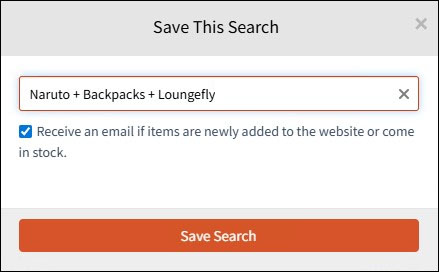
2. Click "Save Search" at the top of any results page. In the pop-up screen, give your search a name, hit Save, and you're done!

Advanced Pro-tips:
- Use the advanced filters (checkboxes) to get as specific as you like when creating your initial searches.
- Instead of the provided default name, add the filters you used to make it easier to remember what items each unique search returns as shown below:
How to use my Saved Searches?
1. You can now instantly run your custom searches from a new Saved Searches button that will appear just to the right of the Search Bar at the top of the website when you are logged in. (see image below)
2. Select any Saved Search from your list and instantly be taken to the specific criteria you created for that search. For example, link directly to all the available Spider-Man Action Figures by Hasbro under $25.
3. You can also get email updates when any new items match any of your Saved Searches! For example, if you created a Saved Search on the Star Wars Black Series Collection page, you will get an email whenever an item on that page is newly added or comes back in stock. Click "Manage" in your Saved Search list to rename or delete searches, and decide which ones to receive emails on.
